
Screenshots
See below.
Download
Currently prepared packages are available for:
 Download
OSX dmgs here.
Download
OSX dmgs here.
Recent ubuntu packages: see
here.
|
News
june 26, 2012 Made CuePlay work under OSX Lion
march 10, 2012 Added recording functionality |
Welcome to CuePlay
A long time ago I ripped my entire CD collection to a bunch of mp3
files. I wanted to listen to my music on my laptop. However,
I've got a lot of classical music and as I didn't want the annoying
MP3 Gap during a track change while listing to e.g. a Mahler
symphony, I decided to rip each CD to 1 single mp3 file, accompanies
by a CUE Sheet (see wikipedia).
I could have choosen to rip my CDs to a bunch of FLAC files, but
FLAC format just takes too much space for me. So I choose a good
quality mp3.
This works great with software like FooBar2000 on Windows. It
didn't work that well on Linux, because there was no player that
could handle cuesheets very well. So, I just wrote my own Gtk-Perl
application, CuePlay, that I could use as my music center.
CuePlay (screenshots) is an audio
player for Linux and Mac OS X (currently 10.6 (v0.89) and 10.7 are
supported). It has been created to be able to play MP3 and FLAC
files with cuesheets. This enables one to create one long MP3/FLAC
file and index it with a .cue file.
Features
Currently CuePlay supports:
- mp3 files with cue sheets.
- flac files with cue sheets.
- mp3 files with m3u playlists.
- Listening and recording Web
Radio.
Music files are put into a Music directory, which may contain
subdirectories, along with playlist files (.cue and .m3u). That's
all. CuePlay lets you navigate through your Music directory and
choose the music to play. CuePlay features cover images through an extra tag in .cue files or a
'cover.jpg' file. The format of cue sheets for CuePlay can be found
here. CuePlay uses mpg123 and flac123 for
playback.
Installing
On Mac OS X, just copy the
CuePlay icon to your application folder. CuePlay expects your music
files in a subdirectory of your Music folder: <Music
folder>/CuePlay. That's all and should make CuePlay do it's job.
Using Ubuntu, just install
the downloaded '.deb' file using 'Ubuntu Software Centre'. A better
alternative is to add this ppa
repository to your apt sources and install right away without
downloading the '.deb' files. As of 2012, '.deb' downloadable files
are not updated anymore. CuePlay defaults to the ALSA sound system
on your primary sound device (hw:0,0) and expects it's music in the
directory '~/Muziek'.
After installing CuePlay, you can edit '~/.cueplay/cueplay.ini'
to change these settings. If you are running CuePlay and want your
sound on a secondary sound device (e.g. an USB sound device,
connected to your HiFi), you need to change some settings and do some special stuff for playing flac
files.
|
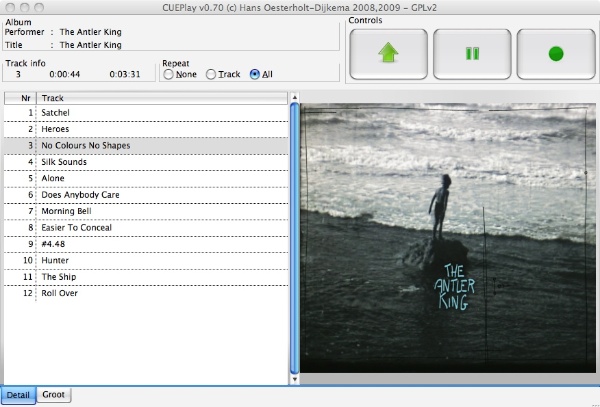
CuePlay in action on Mac OS X 10.6 (v0.70)
|
|
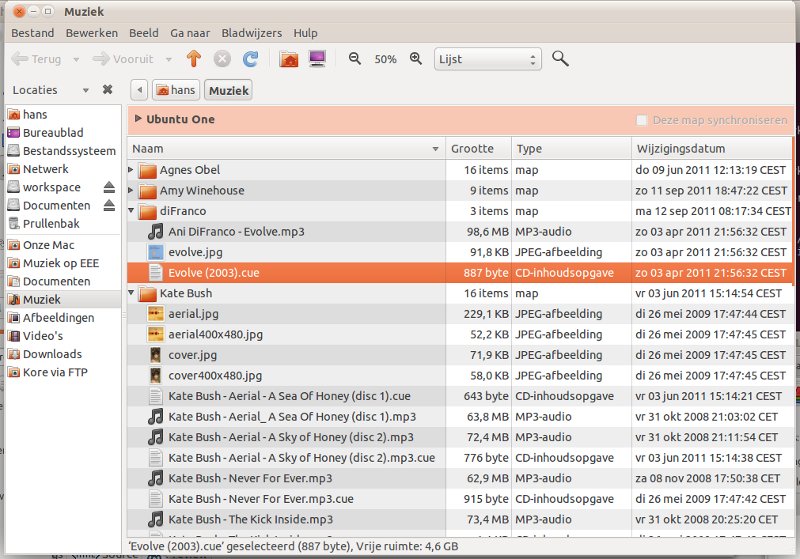
Contents of a CuePlay Music Directory
|
© 2011 Hans Oesterholt-Dijkema - Artistic
License